The Team tab
The Team tab shows what's happening in the session right now and what the team's work added up to this week.
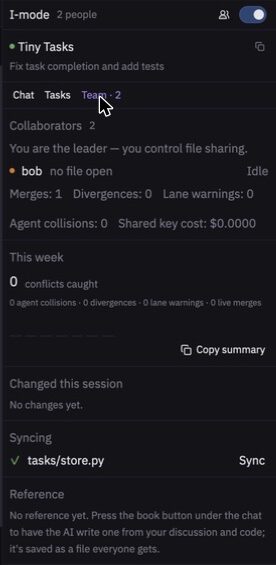
Collaborators
Lists who is present, what file they have open and whether their agent is active. The numbers mean:
| Count | Meaning |
|---|---|
| Merges | Edits made at the same time that were merged live. |
| Divergences | Changes that drifted from the shared reference. |
| Lane warnings | Edits outside the person's assigned task. |
| Agent collisions | Times an agent stepped back from a function another agent held. |
| Shared key cost | Estimated spending on the service's AI key in this session. |
This week
Shows the conflicts caught across your sessions in the last 7 days. Select Copy summary to get a one-line status you can paste into an update.
Changed this session
Lists files changed during the session. Select a file to open it.
Syncing
Lists the files being shared, with a Sync button for each.
Reference
Shows the shared reference, if your team has one.