Task board
The Tasks tab turns your team's discussion into a plan, with one owner for each task.
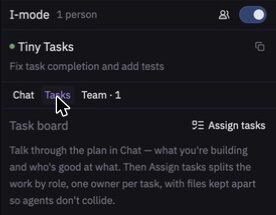
Create a plan
- In Chat, talk through what you're building and who is good at what. The more specific you are, the better the split.
- Open the Tasks tab.
- Select Assign tasks.
I-IDE splits the work by role, with one owner per task and files kept apart so that agents don't collide. In a You lead session, only the leader can do this.
Work on a task
| Select | To |
|---|---|
| Start with my agent | Hand the task to your Agent Panel. Its edits show in the I-mode panel for syncing. |
| Mark done | Mark the task as finished. |
| Reopen | Put a finished task back in progress. |
Stay in your lane
If someone edits files outside their task, the session counts a lane warning, which appears in the Team tab. It's a prompt to check in with each other, and nothing is blocked.
Important
Assigning tasks uses the service's shared AI key, so AI limits apply.